May - June 2024
Core skills: Research, Graphic Design, Prototyping, User testing.
Touch-controlled games are more immersive - however, creating intuitive touch gestures is challenging and can confuse players when not done properly. Likewise, input zone placement, screen orientation and their interaction may impact player immersion, affect and challenge. This is relevant, because immersion, affect and challenge contribute to game experience, also known as flow.
This paper aims to investigate whether there exists a preferred touch gesture for a mobile game in different orientations. The research question was: How do button and slider touch gestures affect player performance and satisfaction in mobile endless runner games, across portrait and landscape screen orientations?
To research this, we created our own endless runner game. The game has infinite gameplay, no winning state and only one level. The level is randomly generated each time, to ensure different obstacles each time. It has simple control, “left and right” or “up and down”. Player scores a point when an obstacle is hit. A scorecount is tracked. Our MVP:
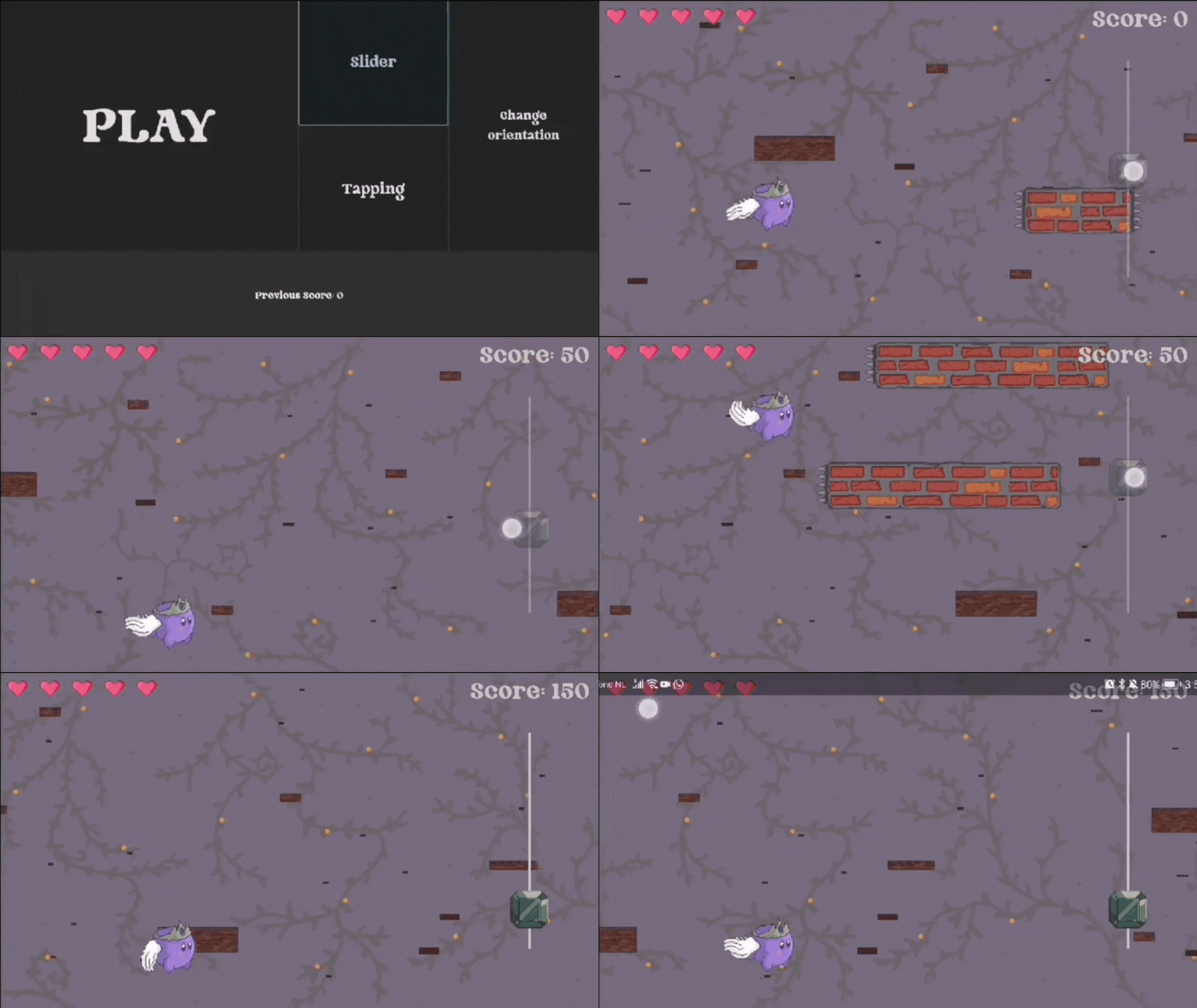
Example of game in landscape orientation, slider touch input
The game was developed using Godot 4, an open source game engine known for its flexibility and ease of use, providing a large set of tools and out-of-the-box solutions that allowed for fast development.
Since Apple has high restrictions for mobile development, we decided to port the game to Android only. To ensure that the game can be played seamlessly in both landscape and portrait orientation, we opted for simple, mostly geometric visuals. This minimizes the differences in perceived gameplay between the two orientations.
The game itself is an "endless runner" where the player controls a character that moves along a single axis (y-axis in landscape mode, x-axis in portrait mode). Obstacles enter the screen (from the right in landscape mode, from the top in portrait mode) and move toward the player until they reach the other side of the screen or are destroyed. The player can score points by bouncing off the sides of obstacles until the obstacles' hit points are depleted, but hitting obstacles head-on or touching the damage areas on their sides will reduce the player's hit points. Powerups are available to help the player, such as replenishing some hit points.
Participants for the pre-study were introduced to the game and asked to test it in a think-out-loud format. Afterwards, follow-up questions about the game's concept, implementation, and design were asked. This led to adjustment of the difficulty level of the game, as it was initially perceived as too challenging. Additionally, design ideas were gathered, considering the preliminary version used placeholder graphics. While this was not an extensive pre-study, it supported the ongoing development process and helped us clarify the direction of the game.
The study involved 16 participants (12 males, 4 females) aged 22 to 27, mostly master's students, recruited through convenience sampling. For the experiment, the game was ran on an Android smartphone. Equipped with both portrait and landscape orientations, supporting button and slider inputs.
User experience was assessed using a shortened version of the Game Experience Questionnaire (GEQ), focusing on immersion, flow, competence, tension, challenge, and affect. Participants also completed a brief questionnaire on control preference and feedback. Participants were randomly assigned to either button or slider controls, with orientation order randomized to control order effects. Each participant played five rounds per orientation, with performance measured by game score. Afterward, they completed the GEQ and answered open-ended questions about preferences and feedback.
The study results were analyzed using input method and screen orientation as independent variables (both with two levels), while game score and user experience served as dependent variables (both continuous).
We found that the choice of input mode significantly affects player performance. Specifically, the slider input mode led to lower performance compared to the button mode, suggesting that buttons are easier or more intuitive to use. Contrary to expectations, screen orientation did not significantly impact player performance or satisfaction, differing from other studies that found orientation effects. This may be due to the game's design minimizing orientation differences. Player satisfaction was consistently high across all conditions, indicating enjoyment. Neither input mode nor screen orientation significantly impacted user experience, suggesting that game design and gameplay have a greater influence on overall satisfaction, aligning with previous research on flow and immersion.